

Update, 26 Sep 2026: The Bill 60 changes this article describes as pending took effect in stages on July 1 and September 21, 2026: a request to review an LTB order must be made within 15 days (since July 1); an N4 given on or after September 21 needs 7 days' notice; on an L1 filed on or after September 21, a tenant who wants to raise other issues at the hearing must first pay the landlord half the arrears claimed; and a landlord's-own-use N12 served on or after September 21 with at least 120 days' notice owes no compensation (a purchaser's N12 still does). Source: the LTB operational update of September 21, 2026.
Ontario's rental market runs on a regulatory framework that no other province matches in complexity. The Residential Tenancies Act (RTA), Landlord and Tenant Board (LTB) forms, the annual rent increase guideline, Bill 60 amendments, trust accounting requirements, and CMRAO licensing rules create compliance obligations that generic property management software simply wasn't designed to handle.
If you manage rental units in Ontario — whether five doors or five hundred — the software you choose in 2026 needs to do more than collect rent. It needs to understand your province. This guide breaks down the features, compliance capabilities, and operational tools that Ontario property managers should evaluate before committing to a platform.
Why Ontario PMs Need Province-Specific Software
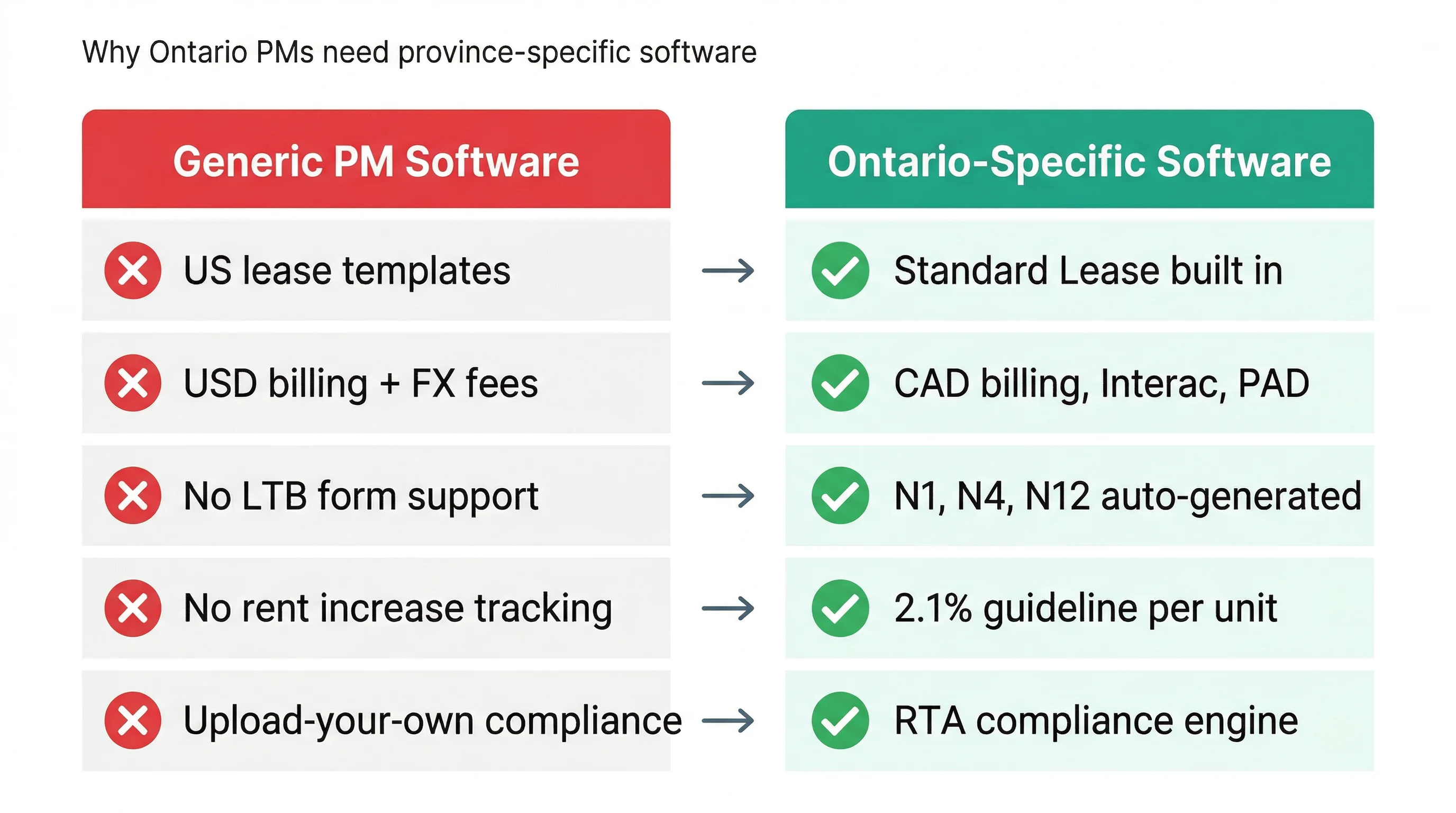
Most property management platforms on the market were designed for the American landlord-tenant ecosystem. They handle US-centric lease templates, ACH payments in USD, and IRS-friendly reporting. When Canadian PMs adopt these tools, they inherit a patchwork of workarounds: uploading Ontario Standard Lease PDFs manually, converting currency, tracking HST/GST outside the platform, and building spreadsheet sidecars for LTB form workflows.
Ontario's regulatory environment is particularly demanding. The 2026 rent increase guideline is set at 2.1% — the lowest in four years and down from the 2.5% cap that held through 2023–2025. Property managers need to calculate this correctly across every unit, serve N1 notices with the proper 90-day lead time, and track which units are exempt from rent control under the November 2018 new-build rules. Getting any of these wrong can void a rent increase entirely.
Beyond rent increases, Ontario PMs navigate N4 notices for arrears, N12 personal-use evictions, N13 renovictions, L1 and L2 LTB applications, Above-Guideline Increase (AGI) applications, and Section 123/125 service charge rules. Bill 60 (Fighting Delays, Building Faster Act, 2025) received Royal Assent in November 2025 and brought significant changes to eviction timelines — including cutting the N4 notice period from 14 days to 7 for monthly and yearly tenancies, for notices given on or after September 21, 2026, when that change took effect. Software that treats these evolving requirements as "add your own template" problems is not solving your actual workflow.
The Eight Features That Matter Most
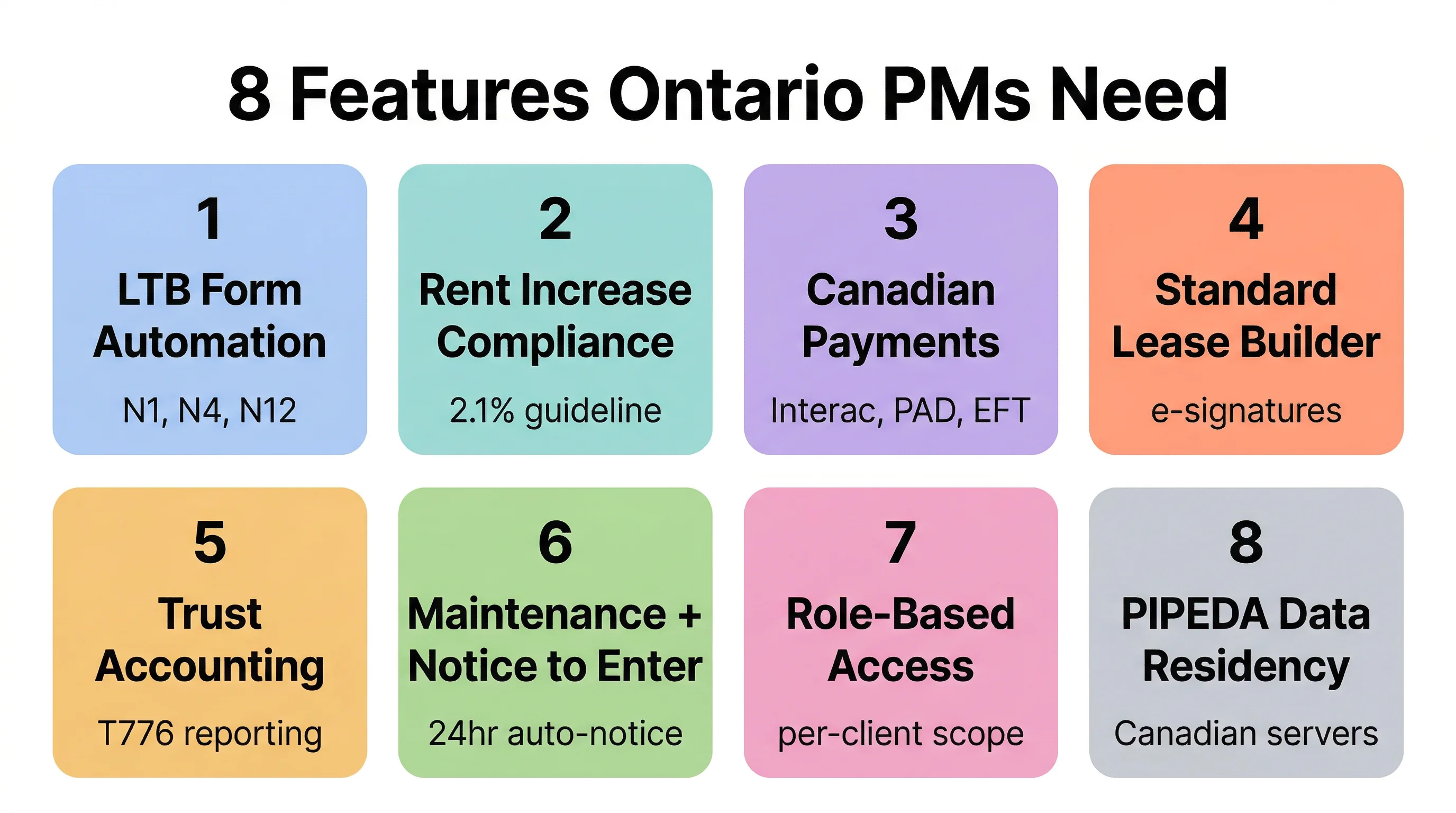
1. Ontario LTB Form Automation
This is the single most important differentiator. Your platform should auto-populate N1, N4, N11, N12, and other N-form notices directly from tenant and lease data — no re-entry, no separate PDF editor, no risk of transcription errors. Look for platforms where the form workflow is integrated into the tenant record, not bolted on as a document template.
Pay particular attention to how the software handles the N4-to-L1 timeline. When a tenant falls behind on rent, the clock starts ticking: the N4 notice must be served correctly, the termination period must expire (7 days for notices given on or after September 21, 2026; 14 days for monthly and yearly tenancies before that), and the L1 application must be filed with supporting documentation. Software that tracks this timeline and prompts you at each step prevents costly procedural errors.
2. Rent Increase Compliance Engine
At a minimum, the software should know the current guideline (2.1% for 2026), calculate the correct increase per unit, flag units exempt from rent control, enforce the 12-month minimum between increases, and generate the N1 or N2 notice with the required 90-day notice countdown. For larger portfolios, bulk rent increase workflows that let you process 50–200 units in a single batch are essential.
Calculate Your Increase: Use our free Ontario Rent Increase Calculator to check the maximum legal increase for any unit under the 2026 guideline. Try the calculator →
The software should also handle the nuance around post-November 2018 units. These are exempt from rent control, meaning landlords can raise rent by any amount — but they must still follow the 12-month and 90-day notice rules. A good compliance engine flags exemption status at the unit level, not the building level, because mixed-vintage buildings with both controlled and exempt units are increasingly common in Ontario.
3. Canadian Payment Processing
Your tenants pay in Canadian dollars from Canadian bank accounts. The platform should support Interac e-Transfer, pre-authorized debit (PAD) through Canadian banks, and ideally direct EFT processing — not US-based ACH converted to CAD with fees attached. Automated invoicing, receipt generation, and arrears tracking should flow directly from payment records into your accounting ledger.
Watch out for platforms that advertise "Canadian support" but actually route payments through US payment processors. The tell: they charge in USD and convert, or their PAD integration requires a US-based intermediary bank. Native Canadian payment processing means lower fees, faster settlement, and no currency risk.
4. Ontario Standard Lease Builder
Ontario mandates the use of a government-issued Standard Lease for most residential tenancies. The right software generates this lease from unit and tenant data, supports e-signatures, and stores it as part of the tenancy record. Pay attention to whether the platform handles Section 15 additional terms correctly — particularly the new-build rent control exemption clause that landlords must include for post-November 2018 units.
A strong lease builder also pre-populates fields like the legal rent amount, parking and storage charges, and utility responsibilities from your property records, reducing errors and saving time during tenant onboarding.
5. Trust Accounting and Financial Reporting
Ontario property managers are expected to maintain clear separation between operating funds and client trust funds. Your software should track income and expenses by property and by landlord client, generate owner statements, and organize data by CRA T776 categories: advertising, insurance, interest, maintenance, management fees, property taxes, and utilities.
If you're managing multiple landlord clients, per-client financial isolation is non-negotiable. A shared ledger across all clients creates compliance risk and makes tax season a nightmare. The software should produce T776-ready reports that your clients' accountants can use directly, reducing back-and-forth and demonstrating your professionalism.
6. Maintenance Workflow with Notice to Enter
Maintenance requests should flow from tenant submission through to vendor assignment, scheduling, and completion — with built-in Notice to Enter generation for any work that requires property access. Ontario's RTA requires 24 hours' written notice in most situations, and the software should produce the notice automatically when a maintenance visit is scheduled.
For PMs managing 50+ units, look for platforms that support scheduled and preventive maintenance (furnace inspections, fire alarm testing, seasonal HVAC service) with automatic notice generation for each affected unit. This is where scale either breaks your workflow or makes it seamless.
7. Role-Based Access Control (RBAC)
If you run a PM firm with staff handling different functions — leasing, maintenance coordination, accounting — you need granular permissions. RBAC lets you control who sees financial data, who can issue notices, and who has access to specific landlord client portfolios. For firms managing properties on behalf of multiple landlords, property-owner-scoped access ensures each landlord only sees their own units through a dedicated owner portal.
8. Canadian Data Residency and PIPEDA Compliance
Tenant data includes sensitive personal information: credit reports, employment records, bank details, identification documents. Your software should store data on Canadian servers (or at minimum SOC-2 compliant infrastructure), comply with PIPEDA privacy requirements, and give you audit trails showing who accessed what and when. This isn't just a best practice — it's increasingly a requirement in PM contracts with institutional landlords and condo boards.
What Bill 60 Changes Mean for Your Software Choice
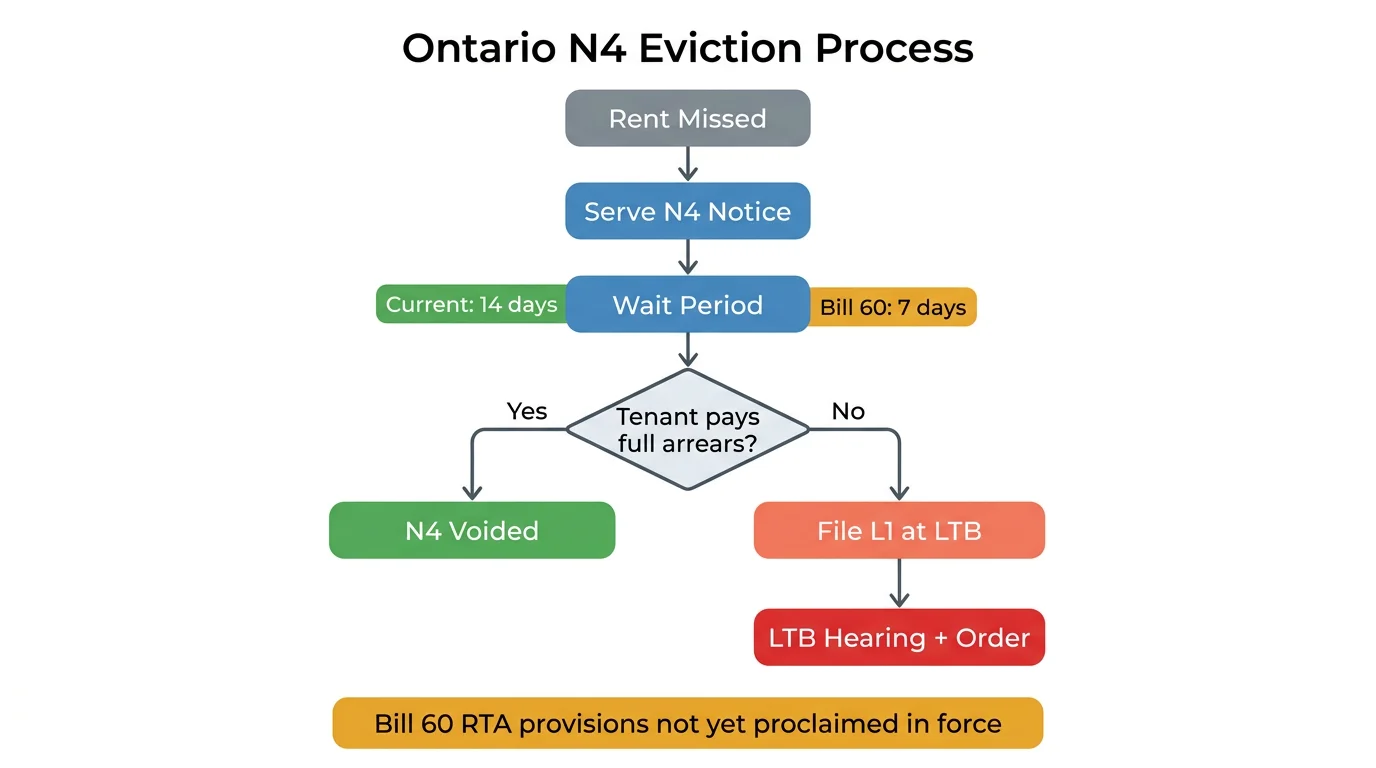
Bill 60 (Fighting Delays, Building Faster Act, 2025) received Royal Assent in November 2025 and introduces several procedural changes to Ontario's eviction process that directly affect PM workflows. The most notable change: an N4 given on or after September 21, 2026 needs 7 days' notice instead of 14 (for monthly and yearly tenancies), so landlords can file an L1 eviction application a week sooner than before.
When this article was first written, the RTA provisions under Schedule 12 of Bill 60 had not yet been proclaimed in force. That has since changed: the N4, 50%-of-arrears and N12 changes described in this section took effect on September 21, 2026. An N4 given on or after that date needs at least 7 days' notice; the old 14-day minimum for monthly and yearly tenancies applies only to notices given before it. The province has regulation-making authority to stagger the implementation, so PMs should monitor proclamation dates closely.
Other Bill 60 changes include: tenants must pay 50% of claimed rent arrears — directly to the landlord, at least seven days before the hearing — before raising maintenance or other issues at a non-payment hearing on an L1 filed on or after September 21, 2026, and a landlord who serves an N12 on or after September 21, 2026 with at least 120 days' notice, because the landlord, their spouse, a child or parent of either, or a caregiver for one of them will move in, no longer has to pay compensation or offer another unit (this does not apply to an N12 for a purchaser's use). Separately, a request to review an LTB order must now be made within 15 days (since July 1, 2026), while the 30-day deadline to appeal an order to the Divisional Court is unchanged.
This matters because compliance failures in Ontario carry real consequences. A voided rent increase means lost revenue for 12 months. A procedurally defective eviction notice means restarting the timeline from scratch. A trust accounting error can end a PM's client relationship. The software you choose should function as a compliance safety net, not just a filing cabinet.
Questions to Ask Before You Commit
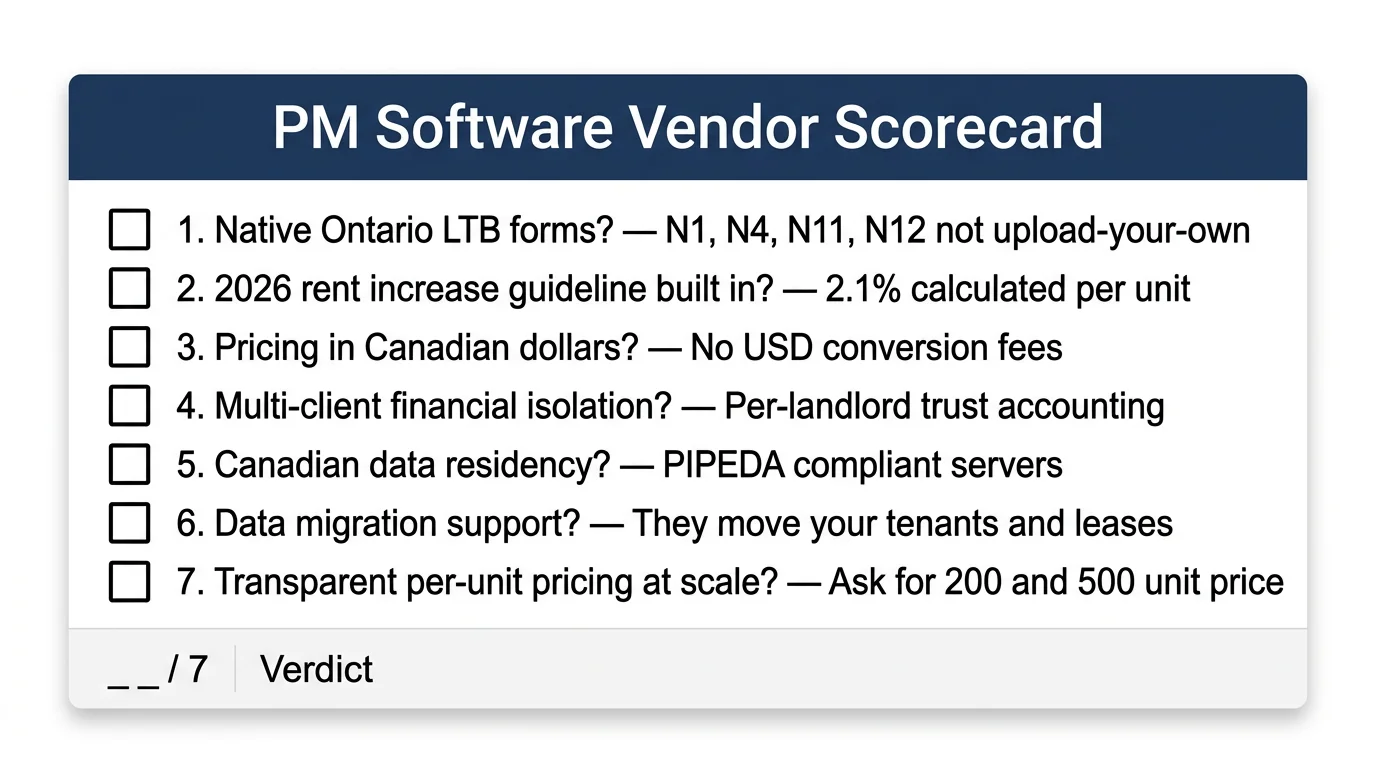
Before signing up for any property management platform, put these seven questions to the vendor:
- Does the platform generate Ontario LTB forms natively, or do I upload my own templates? If it's the latter, you're still doing the compliance work yourself.
- How does it handle the 2026 rent increase guideline? Can it calculate per-unit increases, flag exemptions, and generate N1 notices in bulk?
- Is pricing in Canadian dollars? US-dollar billing on a monthly SaaS subscription adds 30–40% in effective cost depending on exchange rates.
- Can I manage multiple landlord clients with isolated financials? This is critical for PM firms. A shared ledger across all clients is a compliance risk.
- Where is tenant data stored? Ask specifically about server location and privacy compliance, not just "cloud-based."
- What does onboarding look like? Can they migrate your existing lease and tenant data, or are you starting from scratch?
- What's the per-unit cost at my portfolio size? Many platforms offer attractive starter pricing that becomes expensive at 100+ units. Ask for the 200-unit and 500-unit price points.
The Ontario PM Software Landscape in 2026
The market broadly breaks into three categories, each with distinct trade-offs for Ontario property managers.
US-Built Enterprise Platforms
Tools like Buildium, AppFolio, and Yardi Breeze dominate North American market share. They offer mature feature sets for accounting, maintenance, and tenant portals. The trade-off: they were not designed for Canadian provincial compliance. You'll pay in US dollars, use US lease templates (or upload your own), and handle Ontario-specific workflows — N-forms, rent increase calculations, LTB processes — outside the platform. For larger firms with the staff to manage these gaps, they can work. For lean operations, the manual overhead adds up quickly.
Canadian General-Purpose Platforms
Platforms like Haletale, Mi Property Portal, and Propra are built for the Canadian market. They typically support Canadian payment methods, CAD billing, and some level of provincial lease generation. Coverage of Ontario-specific LTB compliance varies significantly — some offer lease templates and basic notice generation, while others go deeper into N-form automation, rent increase workflows, and trust accounting. Evaluate each on the eight features listed above rather than taking "Canadian-built" at face value.
Ontario-First Platforms
A newer category of software built specifically around Ontario's RTA compliance requirements. These platforms treat LTB forms, rent increase guidelines, and provincial lease workflows as core features rather than add-ons. The depth of compliance automation is their primary differentiator — they trade breadth of market coverage for depth of Ontario-specific workflow support.
The right choice depends on your portfolio size, your team structure, and how much time you currently spend on compliance-related manual work. A PM firm managing 200 units across 15 landlord clients has fundamentally different needs than a landlord self-managing a fourplex.
Pricing Models: What Ontario PMs Should Expect
Property management software pricing typically follows one of three structures:
- Flat monthly fee: A fixed price regardless of portfolio size. Simple, but often expensive for smaller portfolios and underpriced for very large ones.
- Per-unit pricing: You pay based on the number of units under management. This scales naturally with your business — $2–$5/unit/month is the typical Canadian range, with volume discounts above 100 or 200 units.
- Tiered plans with add-ons: Base plans cover core features with premium capabilities (RBAC, advanced reporting, AI tools) available as add-ons or on higher-tier plans.
For Ontario PMs, per-unit pricing with volume discounts tends to offer the best alignment between cost and value. You want a pricing model that makes economic sense at 50 units and still works at 500. Watch out for hidden costs: some platforms charge separately for payment processing, form generation, additional users, or premium support. The sticker price per unit means nothing if you're paying three other fees on top.
Making the Switch: What to Expect
If you're currently managing your portfolio on spreadsheets or a platform that doesn't meet the criteria above, switching is less painful than you think — but it does require planning. Here's what a realistic migration looks like:
First, export your current data: tenant records, lease terms, rent rolls, payment history, and maintenance logs. Any reputable platform should offer data import tooling or a migration service. Second, run both systems in parallel for one rent cycle to verify that payment processing, notices, and reporting work correctly. Third, notify tenants of any changes to payment methods — Ontario's RTA requires reasonable notice when changing how rent is collected.
The entire process typically takes 2–4 weeks for a portfolio under 200 units. The bigger the portfolio, the more important it is that the new platform's onboarding team handles the heavy lifting rather than leaving you to figure it out with documentation and a help desk.
The Bottom Line
Ontario property management in 2026 is too complex and too regulated to run on software that doesn't understand your province. The right platform should automate your compliance obligations (LTB forms, rent increase calculations, Notice to Enter), process payments natively in Canadian dollars, isolate financials by landlord client, and scale with your portfolio through transparent per-unit pricing.
Don't evaluate software on feature lists alone. Test it against your actual monthly workflow: Can it generate the N1 notices you need to send next quarter? Does it know that the 2026 guideline is 2.1%? Can your landlord clients log in and see only their properties? If the answer to any of these is no, keep looking.
See How Tenon10 Handles Ontario Compliance
LTB form automation, rent increase compliance, Canadian payments, RBAC, and trust accounting — built for Ontario PMs. Per-unit pricing starting at $3/unit/month.
No long-term contract • Canadian servers • Ontario RTA compliant


