

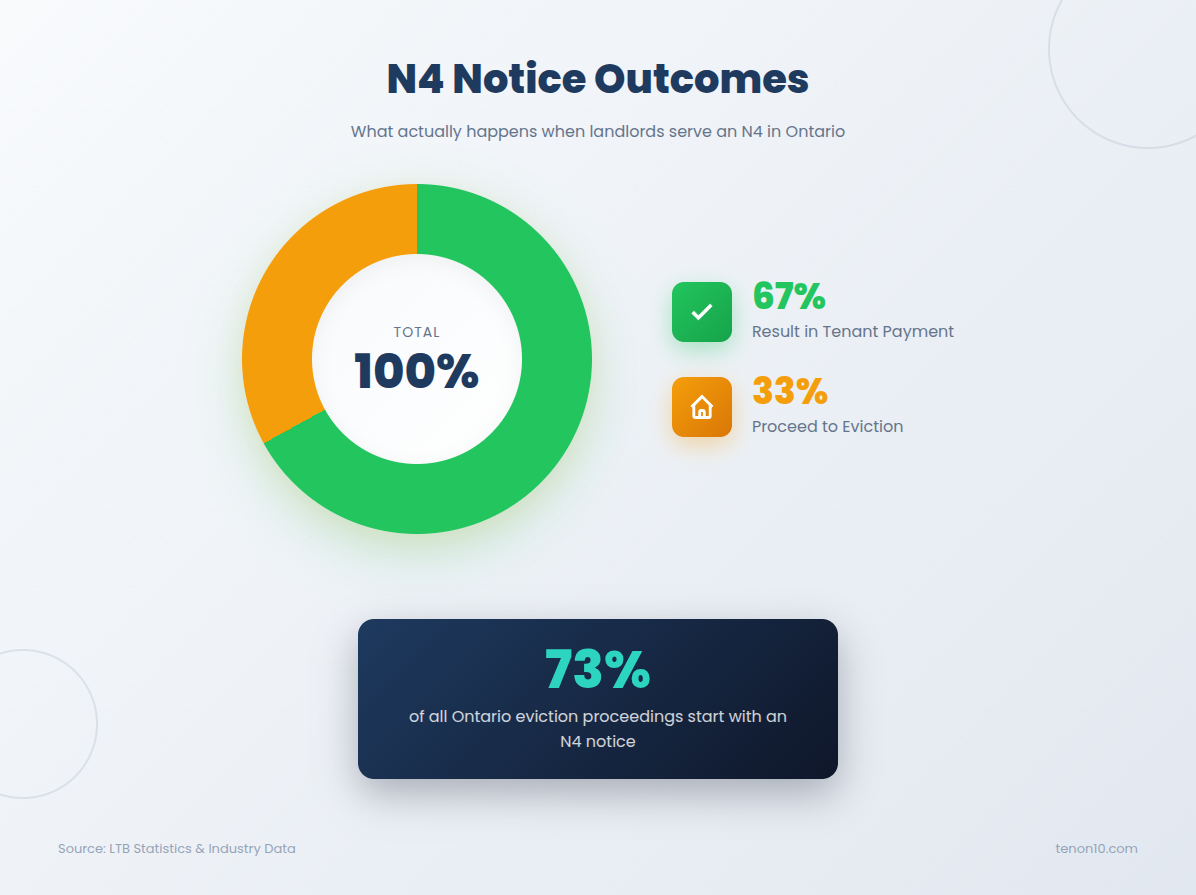
When your tenant misses rent, the N4 Notice is your first—and most critical—legal step. This mandatory form demands payment and warns of tenancy termination, representing 73% of all eviction proceedings in Ontario. More importantly, 67% of N4 notices result in payment without eviction, making it an effective collection tool when done correctly.
In this comprehensive guide, you'll learn exactly how to complete, serve, and follow up on the N4 Notice Ontario landlords rely on for non-payment situations. We'll walk through every step from downloading the form to attending your LTB hearing—including the Bill 60 Ontario changes that reduced notice periods from 14 days to just 7 days.
Before You Start: What You'll Need
Difficulty Level: Medium (attention to detail is critical)
Total Time: ⏱ 1-2 hours to prepare and serve; 4-8 months for full eviction process Ontario if tenant doesn't pay
Cost Estimate: $0 for N4 alone; $186-$700+ if proceeding to L1 application and Sheriff enforcement
Materials Checklist
- N4 Form (official) — Fill out free at tenon10.com/forms or download from tribunalsontario.ca
- Certificate of Service — Download from LTB website (free)
- Copy of your lease agreement — To verify tenant names, address, and rent amount
- Rent payment records — Bank statements, e-transfers, payment history
- Printed copies of N4 — One for each tenant plus one for your records
Tools Required
- Computer with internet — To fill out forms online
- Calculator — Or use our free termination date calculator
- Printer — Print N4 for service
- Camera/smartphone — Document service with photo or video
DIY vs. Hire a Professional
DIY is appropriate for: Straightforward cases with clear arrears calculations and single tenants on the lease.
Hire a paralegal ($200-$400) if: You have multiple months of complex arrears, previous rejected notices, tenant has challenged applications before, or arrears exceed $10,000.
Step-by-Step Instructions
Step 1: Confirm You Can Issue an N4 Notice Ontario
⏱ 5-10 minutes
Verify that your situation qualifies for an N4 Notice Ontario before proceeding. This critical first step prevents wasted time and dismissed applications at the landlord tenant board.
- Confirm rent was missed. The tenant failed to pay rent in full by the due date specified in your lease.
- Verify your standing. You are the landlord or an authorized representative listed on the lease.
- Check RTA coverage. The rental unit is covered by the Residential Tenancies Act (most residential rentals qualify).
- Confirm occupancy. The tenant still lives in the rental unit.
- Wait until the day AFTER rent was due. If rent is due on the 1st, the earliest you can serve is the 2nd.
Step 2: Fill Out the N4 Form
⏱ 5-10 minutes
Complete the official N4 form accurately. Using outdated or unofficial LTB forms is a common reason for dismissal.
Fill Your N4 Online Free
Skip the PDF hassle. Our free N4 generator:
- ✅ No signup required — start immediately
- ✅ Bill 60 compliant — auto-calculates 7-day termination date
- ✅ Digital signatures — no printing needed to sign
- ✅ Emailed to you — instant delivery
- ✅ Mobile friendly — fill from anywhere
Or download the PDF from LTB ↗ if you prefer the traditional method.
If using the PDF method:
- Navigate to the LTB website. Go to tribunalsontario.ca/ltb/forms-filing-and-fees/
- Find the N4 form. Look for "N4 – Notice to End a Tenancy Early for Non-payment of Rent"
- Download properly. Right-click and select "Save link as" to download the PDF
- Save to your computer. Do NOT fill it out in your browser—this causes data loss
- Open in Adobe Reader. Use the free Adobe Reader application, not your browser
Step 3: Complete Page 1 of the N4 Form
⏱ 10-15 minutes
Fill in the tenant information, rental unit address, amount owing, and termination date. Accuracy here is critical for your eviction process Ontario success.
- Enter ALL tenant names (TO: section). Include every adult who signed the lease, spelled exactly as they appear on the lease agreement. Missing or misspelled names can invalidate the notice.
- Enter your name (FROM: section). Use your full legal name or registered company name exactly as it appears on the lease.
- Complete the rental unit address. Include the full address with unit/apartment number, municipality, and postal code. Must match the lease exactly.
- Enter the amount owing. This must match the total calculated on Page 2. Include ONLY rent amounts—no late fees, NSF charges, utilities, parking (unless in lease as rent), or damages.
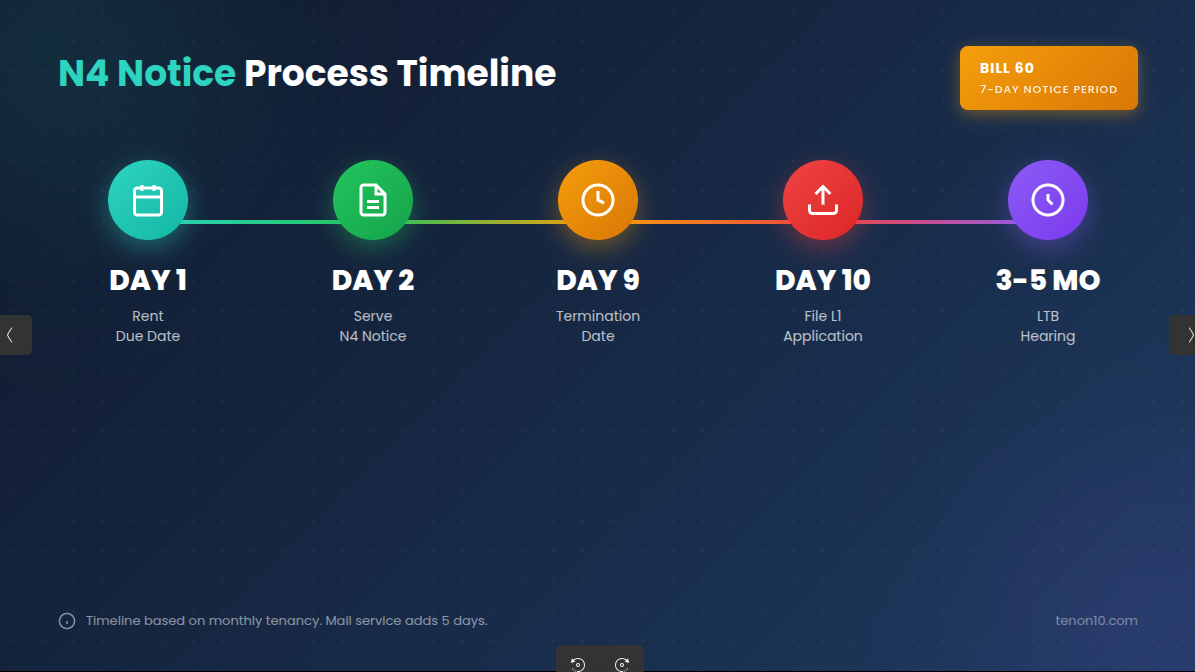
- Calculate the termination date. Minimum 7 days after service for monthly tenancies (Bill 60 Ontario change). Do NOT count the day you serve. Add extra days for mail (+5) or courier (+1 business day).
Example Termination Date Calculation (Hand Delivery):
- Serve notice: January 2nd
- Day 1 of notice period: January 3rd
- 7 days minimum: January 9th termination date
🧮 Don't risk getting the date wrong. Use our free N4 Termination Date Calculator to automatically calculate the correct date based on your service method.
Step 4: Complete Page 2 of the N4 Form (Rent Table)
⏱ 10-20 minutes
Calculate and document the exact rent arrears owed. This page requires careful math that must exactly match Page 1.
- Enter each rental period. Use the format dd/mm/yyyy (Canadian standard) for both "From" and "To" dates.
- Record rent charged. Enter the monthly rent amount for each period.
- Record any payments received. Show partial payments in the "Rent Paid" column.
- Calculate rent owing per period. Subtract paid from charged for each row.
- Total all amounts. Add all "Rent Owing" figures—this total must match Page 1 exactly.
- Sign and date the notice. An unsigned N4 Notice Ontario is completely invalid.
If you have more than 3 rent periods: Combine older periods in rows 1-2. Row 3 must show the most recent rental period. Attach a separate schedule if needed.
Step 5: Serve the N4 Notice to Your Tenant
⏱ 15 minutes to 1 hour
Deliver the non-payment of rent notice using an approved method and document everything carefully.
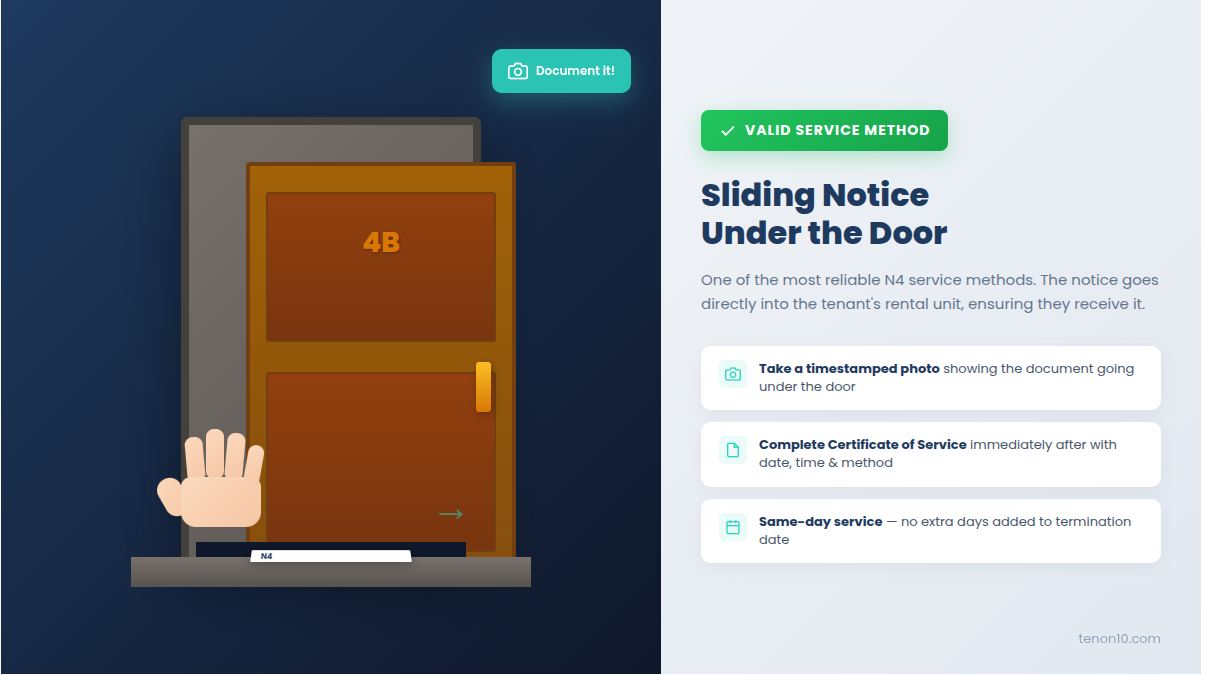
- Choose a valid service method. Hand delivery to tenant (best), hand to adult in unit, in mailbox, under door, through mail slot, courier (+1 day), regular mail (+5 days), or email (ONLY with prior written consent).
- Document the service. Take a photo or video of yourself serving the notice with a visible timestamp.
- Note the details. Record the exact date, time, and method of service immediately.
- Bring a witness if possible. A witness can provide testimony if the tenant claims they never received the notice.
- Keep tracking information. If using courier or mail, retain all tracking numbers and delivery confirmations.
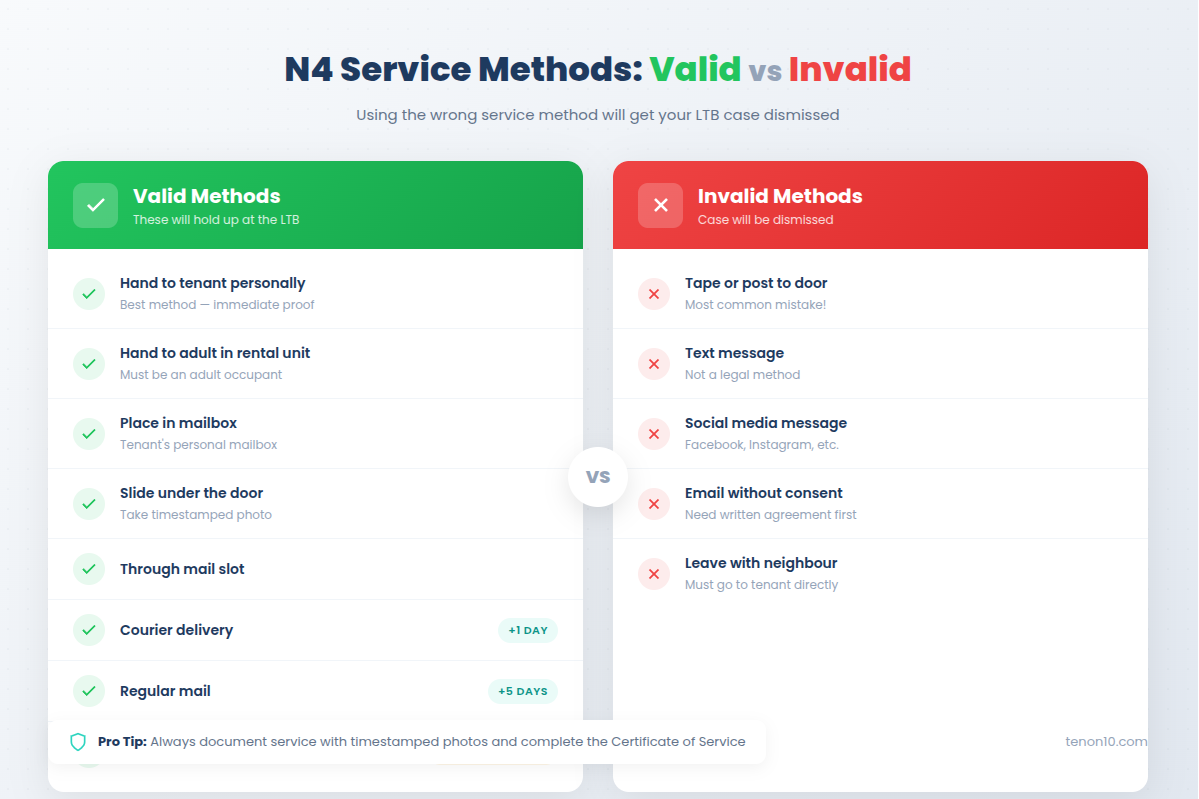
INVALID methods that WILL get your case dismissed:
- ❌ Posting or taping to the door
- ❌ Text message
- ❌ Social media message
- ❌ Leaving with a neighbour
- ❌ Email without prior written consent
Step 6: Complete the Certificate of Service
⏱ 5-10 minutes
Document how and when you served the N4 Notice Ontario. This form is required when filing your L1 application.
- Enter the rental unit address. Must match the address on the N4 exactly.
- List all tenants served. Include every name from the N4.
- Identify the document served. Write "N4 – Notice to End Tenancy for Non-payment of Rent"
- Record the service date. Use dd/mm/yyyy format.
- Check the service method box. Select the method you actually used.
- Sign the certificate. Your signature confirms the accuracy of this document.
Step 7: Wait for the Notice Period to Expire
⏱ 7-14+ days
Monitor for tenant response during the waiting period. Under Bill 60 Ontario, this is now a minimum of 7 days for monthly tenancies.
- Track the calendar. Count the days carefully from the day after service.
- Monitor for payment. Check if the tenant pays the full amount owed.
- Do NOT accept partial payment. Accepting any partial payment after serving the N4 voids the notice entirely.
- Prepare for next steps. Set a calendar reminder for the day after the termination date to file your L1 immediately.
Three Possible Scenarios:
Scenario A: Tenant Pays in Full — The N4 becomes void automatically. Tenancy continues as normal. You cannot file an L1 application based on this notice. If rent is late again, serve a new N4.
Scenario B: Tenant Offers Partial Payment — Do NOT accept. Accepting partial payment voids the notice. Tenant must pay 100% of arrears to void the N4. If you accept partial, you must start over with a new N4.
Scenario C: Tenant Does Not Pay — After the termination date passes, proceed to Step 8. Note: The tenant does NOT have to move out yet. Only an LTB order can legally require eviction.
Step 8: File the L1 Application with the LTB
⏱ 30-60 minutes
If the tenant doesn't pay by the termination date, submit your eviction application to the landlord tenant board.
- Gather required documents. You need the completed L1 Application form, copy of the N4 Notice, Certificate of Service, and payment for the application fee.
- Choose your filing method. Online via Tribunals Ontario Portal ($186) is fastest. Email, mail, or in-person ($201) are alternatives.
- Submit the application. File the day after the termination date—don't delay as arrears continue accumulating.
- Receive confirmation. The LTB will assign a file number and schedule a hearing (currently 3-5 months average wait).
- Notify the tenant. The LTB will send the tenant a Notice of Hearing with the date and time.
Step 9: Prepare for Your LTB Hearing
⏱ 2-4 hours over several days
Gather evidence and complete required updates before your hearing date.
- Submit evidence 7 days before hearing. Send all documentation to the LTB and email/mail copies to the tenant.
- Complete the L1/L9 Information Update Form 5 days before. Update the arrears amount since rent continues accumulating monthly. Submit via portal and send copy to tenant.
- Organize your documentation. Prepare original lease agreement, rent payment records, bank statements, copy of N4 and Certificate of Service, timeline of events, and any communication with tenant about arrears.
- Calculate updated arrears. Add any new months of unpaid rent that have accrued since filing.
Step 10: Attend the LTB Hearing
⏱ 1-4 hours
Present your case and obtain an order from the landlord tenant board.
- Join on time. Most hearings are via Zoom video conference. Log in early and test your connection.
- Have all documents ready. Keep organized copies of everything within reach.
- Present your case calmly. Explain the facts: lease terms, missed payments, N4 service, and current arrears.
- Answer questions honestly. The adjudicator may ask about payment history or communication with the tenant.
- Await the decision. You may receive an order immediately or within days.
Possible Outcomes:
- Eviction Order: Tenant must leave by the specified date. Sheriff enforcement available.
- Payment Plan: Tenant can stay if they follow an agreed repayment schedule.
- Conditional Order: Automatic eviction triggered if tenant defaults on the payment plan.
- Dismissal: Application fails (often due to N4 errors). You must restart the entire process.
After Receiving an Eviction Order: Wait for the date specified in the order. File with the Sheriff's Office for enforcement (~$400-500 fee). The Sheriff will post notice and enforce eviction within 11-30+ days.
10 Fatal N4 Errors to Avoid
These mistakes will get your N4 Notice Ontario dismissed and force you to restart the entire eviction process Ontario from scratch. Tenants actively look for these errors — our tenant guide literally teaches them what to check:
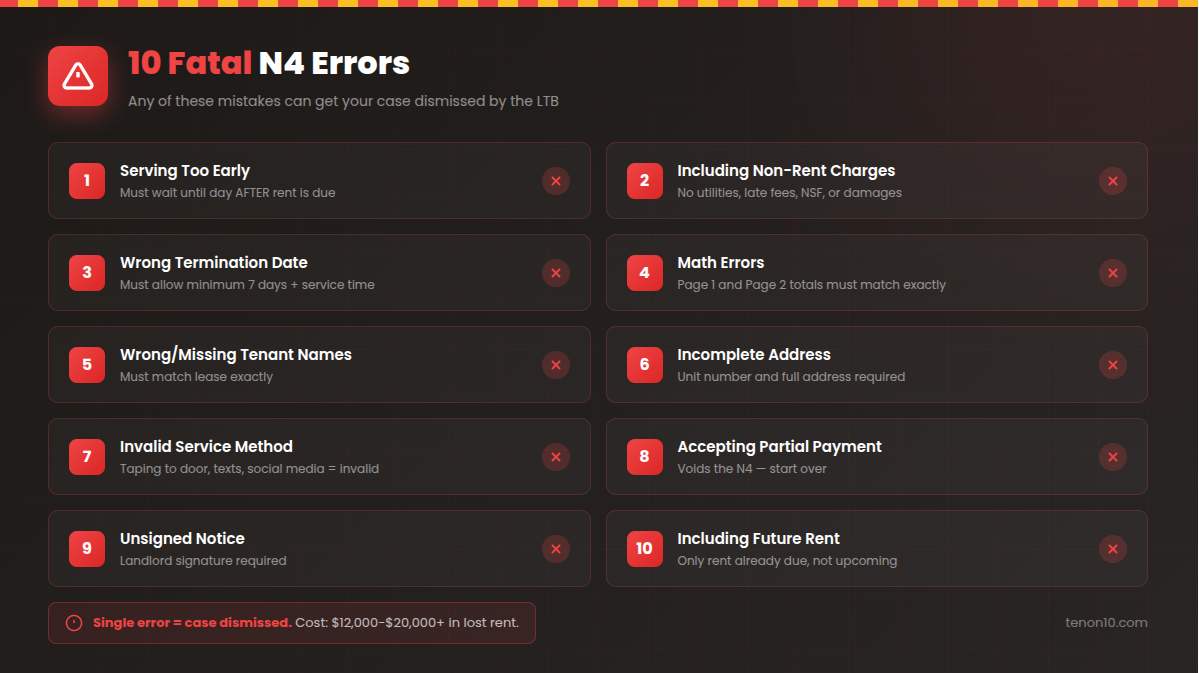
- Serving too early — Before the day after rent is due
- Including non-rent charges — Late fees, NSF charges, utilities, damages
- Wrong termination date — Fewer than 7 days or not accounting for service method
- Math errors — Page 1 total doesn't match Page 2
- Wrong or missing tenant names — Names don't match lease exactly
- Incomplete address — Missing unit number or postal code
- Invalid service method — Taping to door, text message, social media
- Accepting partial payment — Voids the entire notice
- Forgetting to sign — Unsigned notices are completely invalid
- Including future rent — Only include rent currently overdue
Troubleshooting Common Problems
Problem: Tenant claims they never received the N4
Solution: Your Certificate of Service and photo/video documentation proves service. At the hearing, present your evidence of proper service. If you used mail, the tracking information supports your case.
Problem: Tenant paid after termination date but before L1 hearing
Solution: You can still proceed with the L1 application to recover the filing fee and any additional rent that came due. Update your L1/L9 Information Update Form with current amounts.
Problem: You made a mistake on the N4
Solution: Do NOT try to correct and re-serve the same notice. Start fresh with a new N4 Notice Ontario, recalculating the termination date from the new service date.
Problem: Tenant disputes the amount owing
Solution: Bring bank statements and payment records to the hearing showing exactly what was paid and when. The landlord tenant board will determine the correct amount.
Problem: Your L1 application was dismissed
Solution: Review the reason for dismissal carefully. Most often it's an N4 error. Correct the issue and start over with a new N4, then new L1. Yes, it adds months—this is why accuracy matters.
When to Hire a Professional
Consider hiring a licensed paralegal ($200-$400) or lawyer if:
- Your previous N4 or L1 was rejected or dismissed
- The tenant has hired legal representation
- Arrears exceed $10,000 (significant financial risk)
- Multiple tenants with complex lease arrangements
- Tenant raises maintenance or harassment counter-claims
- You're uncomfortable representing yourself at a hearing
- The tenant has successfully challenged LTB applications before
Ready to Get Paid?
The N4 Notice is your most powerful rent collection tool. 67% of tenants pay after receiving a properly served N4 — without ever going to the LTB.
The key is getting it right the first time. One mistake and you're starting over, losing months of rent.
Create Your N4 Notice Now
Free • No signup • Bill 60 compliant • Digital signatures
Takes about 5 minutes. Emailed directly to you.
Related Guides
- Got an N4 Notice? Here's What to Do (Tenant Guide) — Understand how tenants respond and what defenses they might raise
- Bill 60 Ontario: Complete Guide — Full breakdown of the 7-day rule and other changes
- 5 Things Landlords Can't Do in Ontario — Know the boundaries to stay compliant
- All Ontario LTB Forms — Standard Lease, N1 Rent Increase, and more
- N4 Termination Date Calculator — Get your dates right the first time
Frequently Asked Questions
When can I serve an N4 notice?
You can serve an N4 the day AFTER rent was due. If rent is due on the 1st, the earliest you can serve is the 2nd. Serving on the due date itself invalidates the notice.
What can I include on an N4?
Only rent. You cannot include late fees, NSF charges, utilities (unless included in rent), parking fees (unless included in rent), or damages. Including any non-rent charges invalidates the entire notice.
How do I serve an N4 properly?
Valid methods include: hand delivery to tenant, giving to an adult in the unit, placing in the mailbox, sliding under the door, courier (+1 day), regular mail (+5 days), or email (only with prior written consent). Taping to the door is NOT valid.
What happens if the tenant pays after I serve the N4?
If the tenant pays the full amount owed before the termination date, the N4 is automatically voided and the tenancy continues. You cannot proceed with an L1 application based on that notice.
How long until I can file the L1?
You can file the L1 application the day after the termination date on the N4. Under Bill 60, this is a minimum of 7 days after service for monthly tenancies (plus any extra days for mail or courier service).
Can I evict a tenant in winter?
Yes. Ontario has no "winter eviction ban." If you have a valid eviction order from the LTB, it can be enforced by the Sheriff at any time of year.
Legal Disclaimer
This guide provides general information about Ontario's N4 process under the Residential Tenancies Act. It is NOT legal advice. Every situation is unique. For advice on your specific circumstances, consult with a licensed paralegal or lawyer. Laws and procedures may change—always verify current requirements with the Landlord and Tenant Board at tribunalsontario.ca/ltb.
Last Updated: January 2026
Bill 60 Status: Incorporates November 2025 changes (7-day notice period)


